Can a digital notepad ever feel as good as real paper? TCL NXTPAPER Note A1 review
An inveterate notetaker asks where writing on a device matches scribbling or doodling in a notepad - and where analogue wins.

During a conversation I had with TCL last year about innovation in the display space, one idea kept surfacing. The company increasingly sees displays not simply as screens, but as tools that should be designed around different human behaviours.
The NXTPAPER range is probably the clearest example of that thinking, and after spending time with the Note A1, it became apparent that by reviewing it next to its predecessor, the 11 Plus, is the best way to understand what TCL is trying to achieve. In these, the company has built two devices with similar DNA and somehow made them feel like products from completely different worlds.
The 11 Plus is a tablet. The Note A1 is a digital notebook that happens to run Android. That distinction matters.
Same ingredients, different recipes
On paper, these devices almost look like siblings. Both use TCL’s NXTPAPER display technology. Both support stylus input. Both have productivity ambitions. Both sit somewhere between entertainment tablet, reading device and lightweight work machine.
The NXTPAPER 11 Plus behaves exactly how you expect – a conventional Android tablet with a more eye-friendly screen. The Note A1 has a different agenda. It wants to be a digital notebook first and an Android device second.
That sounded perfect to me. I still carry notebooks, scribble ideas in margins, and have reviewed more e-ink devices than any sensible person probably should. The idea of a distraction-reduced writing device with Android flexibility felt like it had been designed to ambush my bank account. To be fair, it did, as I backed the Note A1 on Kickstarter.
That in itself is an odd sentence to write about TCL. For a startup trying to prove demand, crowdfunding makes sense. For one of the world’s major electronics companies, it feels a little surreal. But it also says something important about the Note A1. This does not feel like a standard product from TCL’s usual tablet pipeline. It feels like a controlled experiment to test whether people actually want something more focused and opinionated than a generic Android slab.
That experimental nature runs through the whole device. Sometimes it works beautifully. Sometimes it feels like you have accidentally joined the beta test.
Beyond e-ink
Before going further, it is worth clarifying what TCL’s NXTPAPER technology actually is, because it is often lumped in with e-ink and it really is not the same thing.
NXTPAPER is still fundamentally based on LCD display technology. TCL’s approach is to use hardware layers that diffuse light, reduce glare and filter blue light at the panel level rather than simply applying software colour temperature tricks.
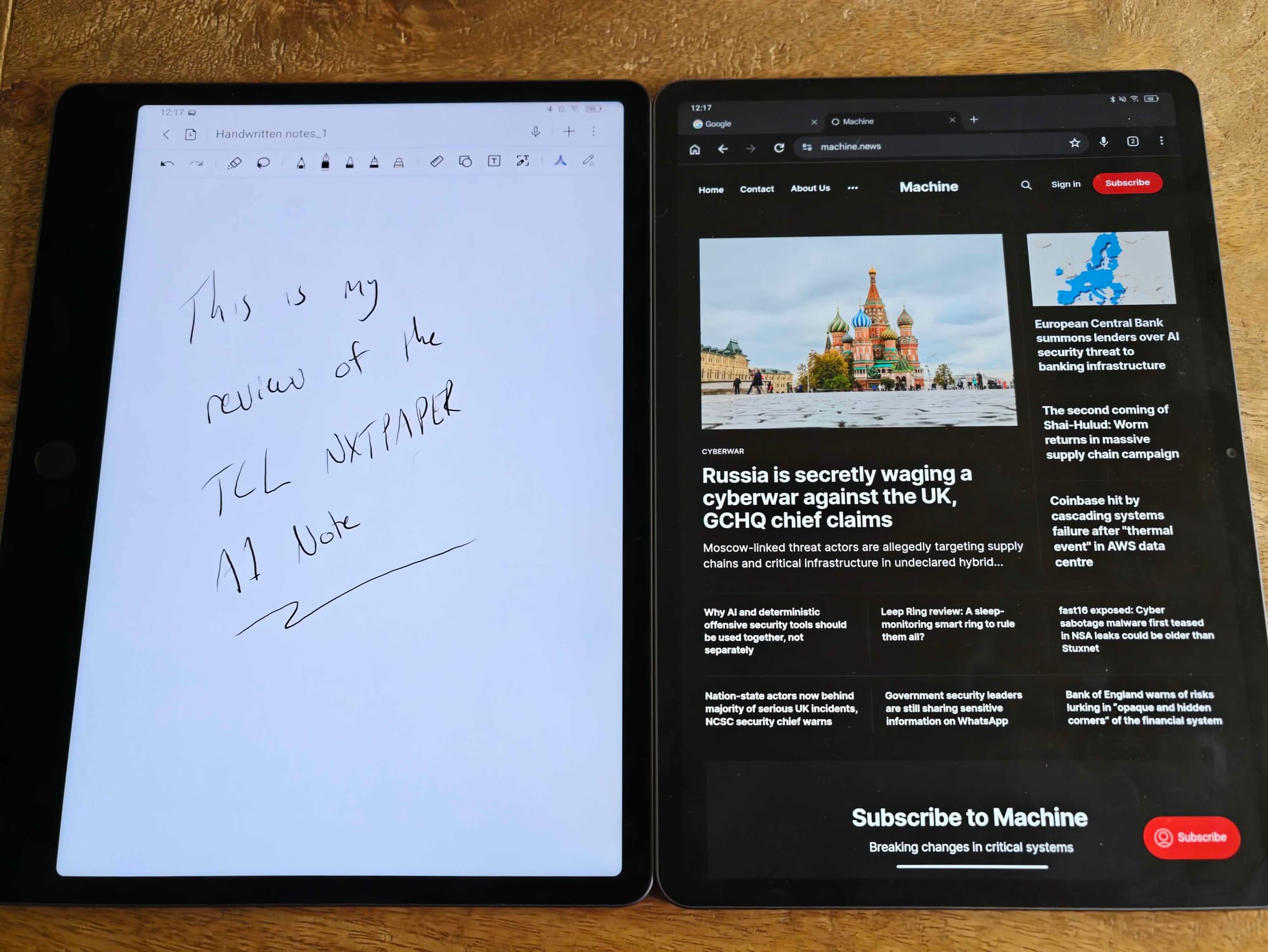
The result is noticeably different from a traditional glossy tablet screen. Reflections are reduced, the finish is more matte and the surface feels closer to paper than polished glass. It is not identical to writing on a notebook, obviously, but it avoids some of the shiny, greasy, mirror-like horror show that makes many tablets unpleasant under bright light.
Compared with e-ink, the trade-off is clear. E-ink displays physically move pigment particles and only consume meaningful power when the image changes. That gives them exceptional battery life and a very paper-like reading experience, but it also explains why they can feel sluggish, why animations are awkward and why ghosting can still be an issue.
NXTPAPER takes a different route. You still get colour. You still get responsive scrolling. Apps behave normally. Video does not look like it is being played through a haunted Etch A Sketch.
Learning to love a bezel
Most tablet manufacturers treat bezels as an enemy. The goal is usually to make them thinner and less visible until the device becomes a sheet of glass you are somehow expected to hold without touching.
The Note A1 takes a different approach, with a noticeably larger bezel down one side. At first, it looks a bit odd - almost as though TCL forgot to finish slimming down one side - but when you start using it as intended and the logic becomes obvious.
Hold the Note A1 like a notepad and your thumb naturally sits on that thicker edge. You get a proper grip without constantly worrying about accidental touches, unwanted page turns or your hand creeping onto the screen. It is a small design decision, but it tells you a lot about the device.
The NXTPAPER 11 Plus feels like a tablet. The Note A1 feels closer to holding a legal pad. That does not make it prettier, but it does make it more useful. Then there is the keyboard.
The notepad that's also a keyboard
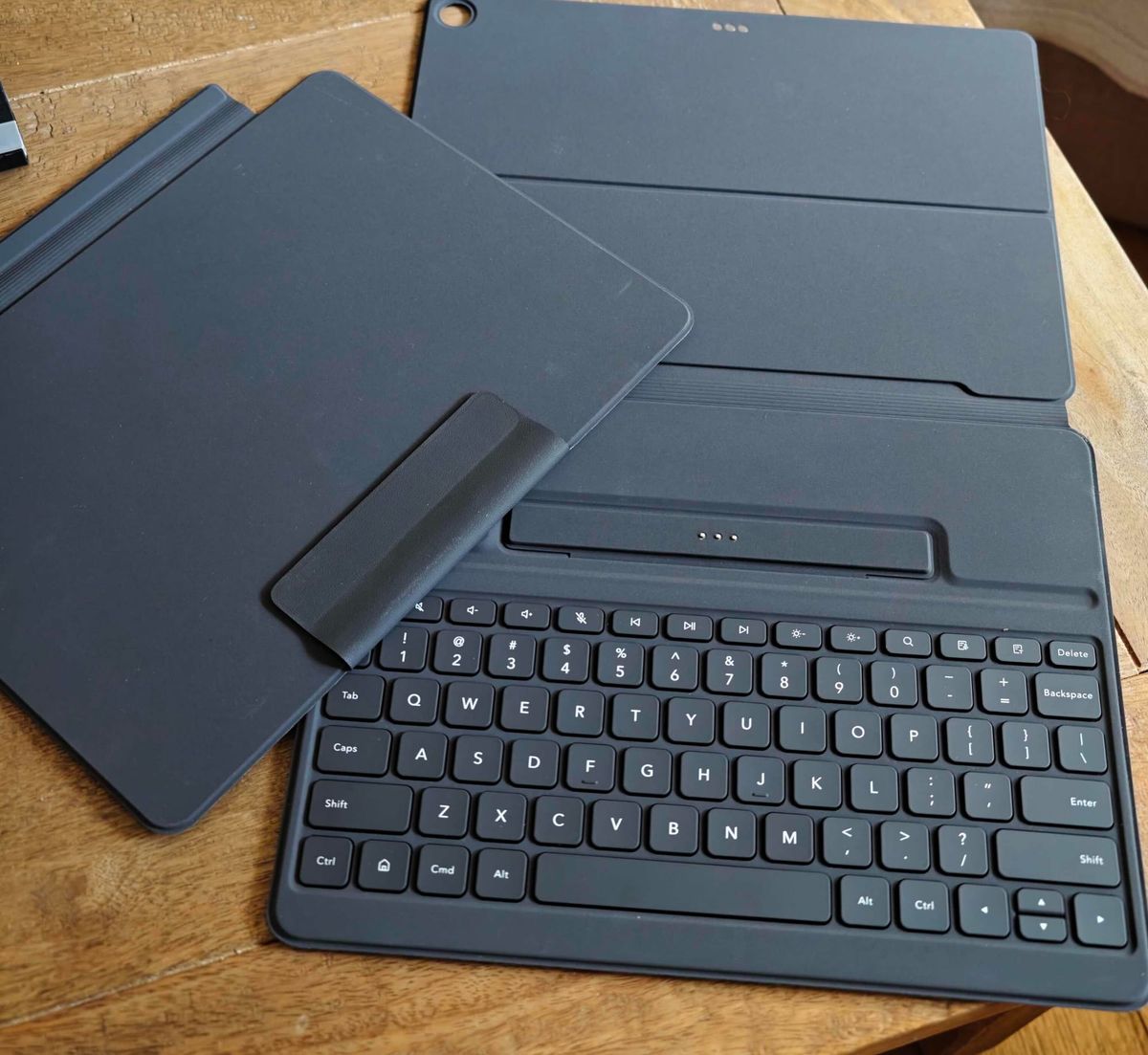
Once assembled, I actually quite like it. Typing feels solid, comfortable and more substantial than I expected. It turns the Note A1 into a more credible lightweight productivity device and, when everything is set up properly, it makes sense as part of TCL’s broader vision.
Getting there is another matter - the keyboard case uses a fold-out arrangement that can only be described as origami-adjacent. The first few times I set it up, I felt less like I was attaching a keyboard and more like I had been handed a puzzle designed by someone who thinks flat-pack furniture is too emotionally generous.
Fold this section. Rotate that flap. Prop this bit underneath. No, not that way. Try again. Question your life choices. Eventually, muscle memory does kick in, but the process remains bulkier and more confusing than it should be. The whole setup also adds a fair amount of thickness, which undermines some of the notebook-like simplicity the device is otherwise chasing.
This is where the NXTPAPER 11 Plus becomes a useful counterpoint. It behaves like a normal tablet with normal accessories and normal expectations. The Note A1 asks you to learn a ritual.
The software has been a moving target
The most awkward part of reviewing the Note A1 – and one of the reasons I’ve held off on this review - is that some of its biggest flaws have been changing since launch.
At first, the software experience felt more restrictive than I wanted. Play Store support was not there, handwriting features needed work and parts of the experience felt unfinished.
To TCL’s credit, updates have started to address some of this. Play Store support has been added, handwriting has been refined and the overall experience already feels more complete than it did when early backers first got their hands on it.
That makes the Note A1 slightly odd to judge. Some frustrations feel like launch rough edges. Others feel more deeply tied to the product’s philosophy.
It is clearly not trying to be a wide-open, do-everything Android tablet – there is the NXTPAPER 11 for that. That is both its appeal and, occasionally, its problem. When the focus works, the Note A1 feels calmer and more purposeful. When it gets in your way, you suddenly remember that Android tablets became generic rectangles for a reason – they’re flexible.
The 11 Plus exposes the trade-off
Using the NXTPAPER 11 Plus alongside the Note A1 makes the difference impossible to ignore.
The former is easier to recommend to most people because it behaves exactly as expected. It gives you TCL’s NXTPAPER display in a familiar package, which means it can be a reading device in the morning, a streaming screen in the afternoon, a note-taking tool during a meeting and a casual gaming machine when your productivity ambitions collapse in the evening.
The Note A1 is more stubborn. It wants to be picked up like a notebook, used with a pen, carried into meetings, used for reading and writing, and treated more like a focused work object than an entertainment slab.
That is why comparing these two devices purely on specs misses the point. The interesting difference is not that one is faster or shinier. The difference is that the 11 Plus adapts to whatever tablet role you throw at it, while the Note A1 is built around a much narrower idea of focus.
For some people, that narrower focus will be exactly the appeal. For others, it will feel like TCL has taken a perfectly capable Android device and politely hidden some of the fun.
Final thoughts
The easiest criticism would be to say TCL should simply have made another NXTPAPER 11 Plus. I am not convinced that would have been more interesting.
The Note A1 frustrated me. The software has felt unfinished in places. The keyboard setup belongs somewhere between productivity accessory and geometry assignment. At times, it seemed actively resistant to behaving like a normal Android tablet. But then, that is largely the point.
The NXTPAPER 11 Plus is probably the safer recommendation for most people because it behaves like a proper all-round tablet. It can be a reading device, entertainment screen, gaming machine, notebook or work companion, and it moves between those roles without much friction.
The Note A1 is designed as a digital notebook first, with Android added to make that notebook more useful. Its appeal is not that it can do everything a regular tablet can do, but that it gives you note-taking, reading, cloud tools, productivity apps and Play Store support without tipping fully into the generic tablet experience.
Despite its shortcomings, if you are looking for a focused note-taking device with a smoother, more responsive screen than e-ink and more app flexibility than a traditional digital paper tablet, the TCL NXTPAPER Note A1 should definitely be on your shortlist.
If you want a more conventional Android tablet that still gives you TCL’s eye-friendly NXTPAPER display, the NXTPAPER 11 Plus is the more obvious and probably more sensible candidate.
The Note A1 shows what happens when TCL builds around a much narrower idea of focus, writing and distraction-reduced productivity. It does not always succeed cleanly, but in a tablet market full of polished rectangles trying to be slightly better versions of the same thing, having a point of view counts for something.